 WenHaoFree
OpenCode MCP Configuration Guide: Complete Tutorial on Extending AI Context

You will learn:
- What MCP is and how it works
- How to configure local MCP services (e.g., shadcn)
- How to configure remote MCP services (e.g., Context7)
- How to mix multiple MCP service configurations
- Verification and troubleshooting tips
What is MCP (Model Context Protocol)?
Model Context Protocol (MCP) is a standardized protocol enabling AI models to access external contexts and tools. Through MCP, OpenCode can connect to local scripts, remote knowledge bases, or specialized services, thereby understanding domain-specific knowledge or invoking external tools. The protocol supports both local command execution and remote HTTP endpoint access, utilizing authentication via OAuth or API Keys.
This article guides you through configuring MCP (Model Context Protocol) services in OpenCode. By configuring MCP, you enable OpenCode to connect to local or remote context services, enhancing its understanding of specific domains or tools.
Configuration Methods
OpenCode supports two MCP configuration methods:
- Local: Running local commands or scripts as MCP services.
- Remote: Connecting to remote HTTP/HTTPS MCP service endpoints.
1. Locate Configuration File
The main configuration file for OpenCode is opencode.json.
macOS / Linux Path:
~/.config/opencode/opencode.json(Located inside the .config/opencode/ folder in your home directory)
2. Edit Configuration
Open opencode.json and locate the root of the JSON object (usually at the same level as plugins), then add or modify the "mcp" field.
Scenario A: Local MCP Only (Example: shadcn)
If you only need to run a local MCP service, such as shadcn’s MCP, configure it as follows:
{
  "mcp": {
    "shadcn": {
      "type": "local",
      "command": ["npx", "-y", "shadcn@latest", "mcp"],
      "enabled": true
    }
  }
}
Scenario B: Hybrid Configuration (Local + Remote)
If you need to connect both local tools and remote knowledge bases (e.g., Context7), combine them like this:
{
  "mcp": {
    "shadcn": {
      "type": "local",
      "command": ["npx", "-y", "shadcn@latest", "mcp"],
      "enabled": true
    },
    "context7": {
      "type": "remote",
      "url": "https://mcp.context7.com/mcp",
      "enabled": true,
      "headers": {
        "Authorization": "Bearer YOUR_API_KEY_HERE"
      }
    }
  }
}Note:
- JSON format must be strictly correct; ensure commas are placed correctly.
- For remote services, be sure to replace
API-KEYwith your actual authorization key.
3. Verify Configuration
After saving the configuration, you need to restart OpenCode or reload the configuration for it to take effect.
- Open a new OpenCode terminal window.
- Enter the verification command:
/mcps - Check Output:
- If successful, OpenCode will echo the list of currently loaded MCP services and their status.
- If an error occurs, check
opencode.jsonfor JSON syntax errors and ensure commands or URLs are accessible.
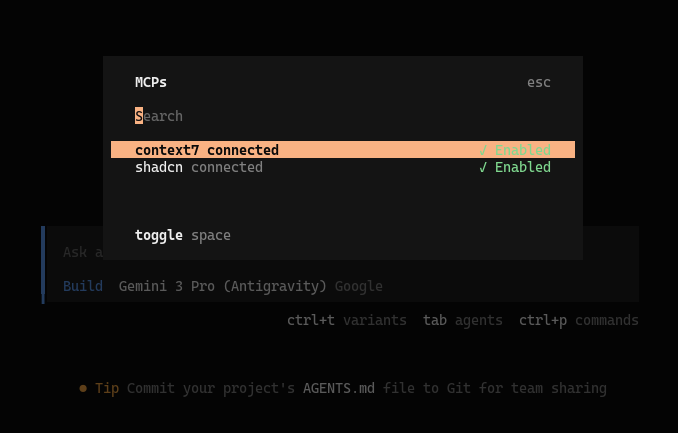
With these steps, you have successfully integrated MCP services into OpenCode. Now try asking questions related to the connected services to test its enhanced context capabilities.
Troubleshooting
Issue 1: /mcps command has no output or shows empty list
Symptom: Running /mcps returns nothing or an empty list.
Possible Causes:
config.yamlpath error- JSON format error (extra commas, missing quotes)
- MCP config not saved or OpenCode not restarted
Solution:
# 1. Verify config file format
cat ~/.config/opencode/opencode.json | python3 -m json.tool

# 2. Check file permissions
ls -la ~/.config/opencode/

# 3. Restart OpenCode (New terminal window)
opencode

# 4. View OpenCode logs
tail -f ~/.config/opencode/logs/latest.log
Issue 2: Local MCP service fails to start
Symptom: Configured local MCP like shadcn, but prompts command not found or fails to start.
Possible Causes:
npxcommand unavailable- Node.js version too low
commandarray format error
Solution:
# 1. Confirm npx availability
which npx
node --version  # Requires v16+

# 2. Manually test command execution
npx -y shadcn@latest mcp

# 3. Check command array format (must be string array)
# ✅ Correct: ["npx", "-y", "shadcn@latest", "mcp"]
# ❌ Incorrect: "npx -y shadcn@latest mcp"
Issue 3: Remote MCP authentication failure
Symptom: Configured remote MCP, but prompts 401 Unauthorized or 403 Forbidden.
Possible Causes:
- API Key incorrect or expired
headersconfiguration format error
Solution:
# 1. Verify API Key validity (using curl)
curl -H "Authorization: Bearer YOUR_API_KEY" \
     https://mcp.context7.com/mcp

# 2. Check headers configuration format
# ✅ Correct format:
"headers": {
  "Authorization": "Bearer sk-xxx..."
}

# 3. Confirm URL correctness (note trailing slash)
Issue 4: MCP service loads but doesn’t work
Symptom: /mcps shows service loaded, but features unavailable in conversation.
Solution:
# 1. Confirm "enabled": true
# 2. Check service for errors (view logs)
# 3. Try asking specific related questions
> Use shadcn MCP to find usage of Button component
FAQ
Q1: Difference between Local and Remote MCP?
A: Main differences lie in running mode and scenarios:
| Type | Local MCP | Remote MCP |
|---|---|---|
| Running Mode | Starts local command/script | Connects to HTTP/HTTPS service |
| Typical Use | File ops, Code tools, Local DB | KB Query, API Call, Cloud Service |
| Network | Not required | Requires stable connection |
| Auth | Usually none | OAuth / API Key |
| Examples | shadcn, local scripts | Context7, KB API |
Q2: Can I configure multiple MCP services simultaneously?
A: Yes. Add multiple service configurations under the mcp object. OpenCode automatically loads all services with enabled: true. E.g.:
{
  "mcp": {
    "shadcn": { "enabled": true, ... },
    "context7": { "enabled": true, ... },
    "custom-tool": { "enabled": true, ... }
  }
}
All enabled services are loaded in parallel, and OpenCode intelligently selects the appropriate service based on context.
Q3: How to view MCP logs?
A: Two methods:
Method 1: Start OpenCode with verbose flag
opencode --verboseMethod 2: View log file
# Real-time log
tail -f ~/.config/opencode/logs/latest.log

# Search MCP logs
grep -i "mcp" ~/.config/opencode/logs/latest.log
Q4: Does MCP increase response latency?
A: Minimal impact:
- Local MCP: Latency typically < 100ms, negligible.
- Remote MCP: Depends on network and server, usually 200-500ms.
OpenCode intelligently calls MCP services only when necessary, not affecting normal conversation speed.
Q5: How to temporarily disable an MCP service?
A: Set enabled to false in the config:
{
  "mcp": {
    "shadcn": {
      "type": "local",
      "command": ["npx", "-y", "shadcn@latest", "mcp"],
      "enabled": false  // Set to false to disable
    }
  }
}
Restart OpenCode to apply.
Q6: How to create my own MCP service?
A: You can create a custom local MCP service:
- Write Script (Python/Node.js/Shell)
- Implement MCP Protocol (Receive stdin, output JSON to stdout)
- Add to Configuration:
{
  "mcp": {
    "my-custom-tool": {
      "type": "local",
      "command": ["python3", "/path/to/your/mcp_script.py"],
      "enabled": true
    }
  }
}
Refer to MCP Protocol Specification for implementation details.
Related Tutorials
Want to further enhance OpenCode? Recommended reading:
- OpenCode Installation Guide - Start from scratch
- OpenCode Skills Installation Guide - Install professional skill packages
- OpenCode Antigravity Integration - Access top LLMs for free
- Claude Code Skills Complete Guide - Understand Skills modular extension