 WenHaoFree
OpenCode Integration with Antigravity: Guide to Using Top LLMs for Free

This article introduces how to integrate the Antigravity proxy service into OpenCode, allowing you to use top-tier large models including Claude Sonnet 4.5 and Gemini 3 Pro for free.
1. Install Plugin
You need to install the opencode-antigravity-auth plugin and configure model definitions.
Method 1: Automatic Installation (Recommended)
Directly enter the following command in the OpenCode conversation to let the Agent automatically execute installation and configuration:
Install the opencode-antigravity-auth plugin and add the Antigravity model definitions to ~/.config/opencode/opencode.json by following: https://raw.githubusercontent.com/NoeFabris/opencode-antigravity-auth/dev/README.mdMethod 2: Manual Configuration
If you prefer manual control, you can edit the configuration file:
Open the configuration file
~/.config/opencode/opencode.json.Add the plugin to the
pluginsarray:{ "plugins": ["opencode-antigravity-auth@latest"] }(Note: Use the
@betaversion if you want to experience the latest beta features)Copy and add the complete model definition configuration (refer to the official documentation for the latest model configuration JSON).
2. Account Authentication
After plugin installation is complete, you need to log in to your Google Account for authorization.
- Restart OpenCode: Open a new terminal window to launch OpenCode.
- Execute Login Command:(If adding a second account, simply run this command again)
opencode auth login - Select Login Method:
- The terminal will prompt you to select a login provider. Use the arrow keys to select Google.
- Browser Authorization:
- The system will automatically open your default browser.
- Please log in with the Google Account that has Antigravity permissions.
- Complete Login:
- Upon successful login, the terminal will display “Authentication successful” or a similar success message.
3. Verification and Usage
Once logged in, verify if the models are available.
Verify Model List
Enter the following slash command in OpenCode:
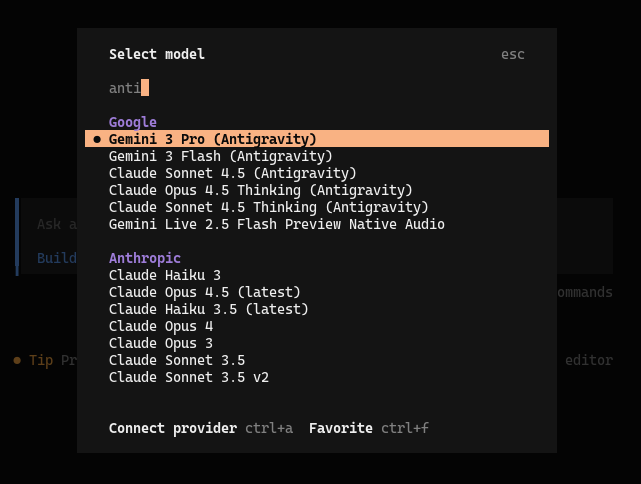
/modelsIn the popped-up model list, you should see a series of models supported by Google Antigravity, such as:
google/antigravity-claude-sonnet-4-5-thinkinggoogle/antigravity-claude-opus-4-5-thinkinggoogle/antigravity-gemini-3-progoogle/antigravity-gemini-3-flash
Quick Test
You can use the following command to directly invoke a specific model for testing:
opencode run "Hello, who are you?" --model=google/antigravity-claude-sonnet-4-5-thinking --variant=maxIf you receive a reply, the configuration is fully successful. Now you can enjoy using these powerful models to assist your programming!